CraftMat Studio v0.6.0: Realtime Eevee Edge Wear in Blender
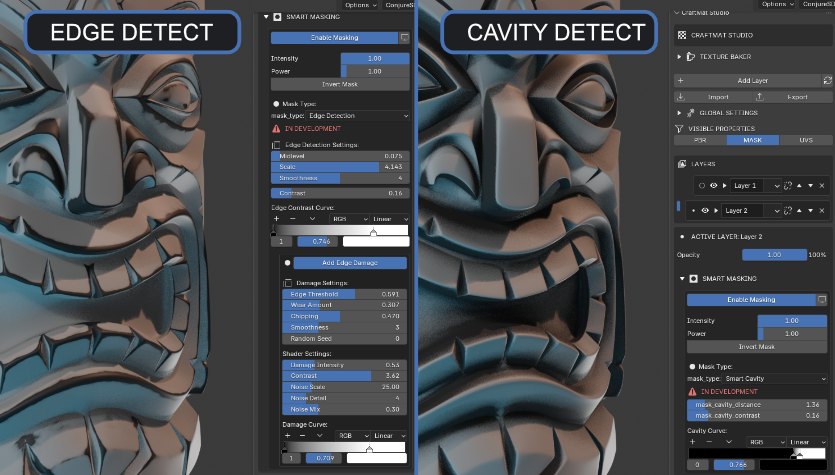
Version 0.6.0 moves edge detection for edge wear into realtime in Eevee. You can tune the mask while you look at the model, then bake every map you need with one click when the asset is ready to ship.
What actually changed in v0.6.0
The big change is where the edge mask is calculated. In earlier versions, edge detection was a step you set up and then waited on. In v0.6.0 the mask is evaluated live in Eevee, which means the orange wear you see in the viewport is the wear you get. There is no bake-first preview loop.
Three things follow from that:
- Realtime feedback. Move the wear amount or edge width and the model updates immediately, even on a hard-surface asset with lots of bevels.
- Controllable wear. The mask is a live parameter set — width, amount, smoothing and seed — not a one-off generated texture you have to redo from scratch.
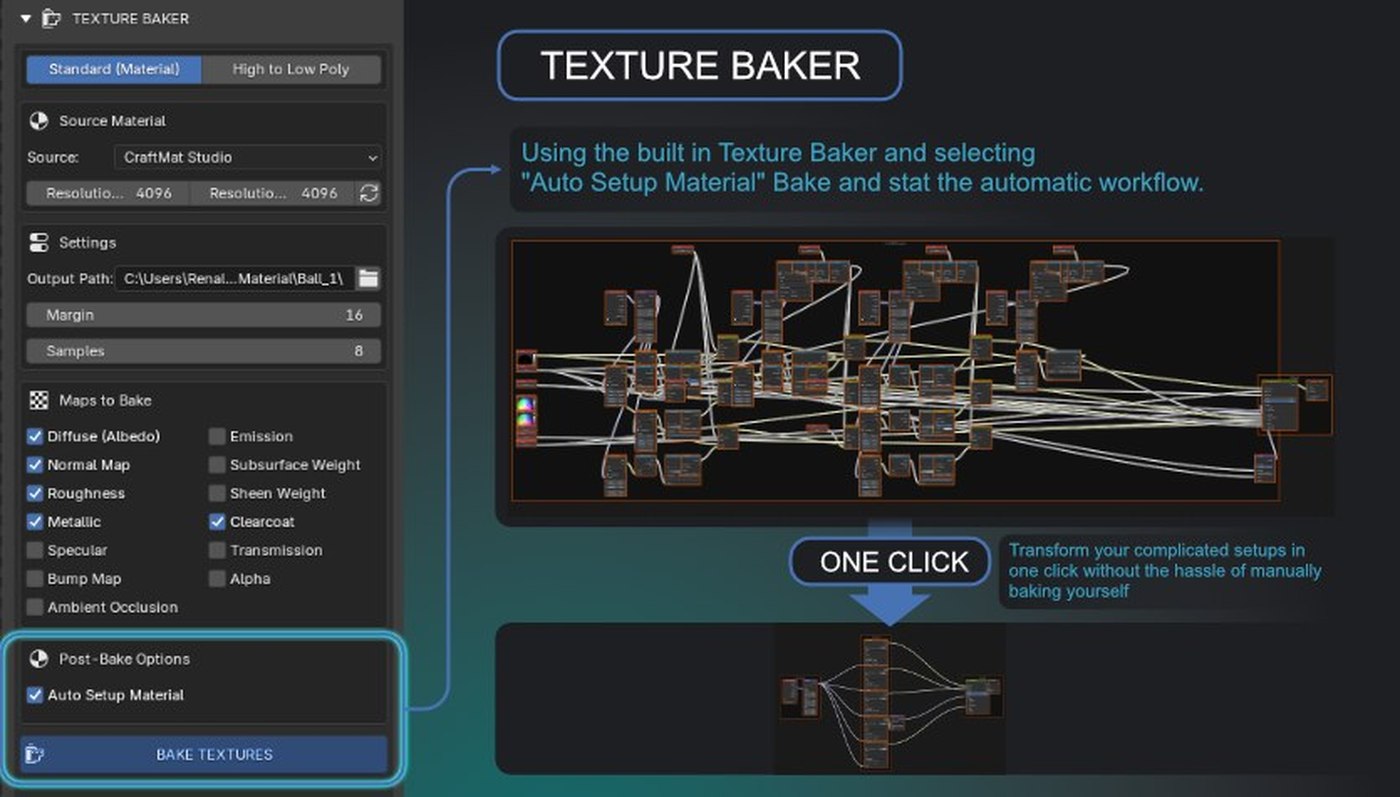
- One final bake. The bake still exists because game engines need texture files. When the look is right, a single button bakes everything into your export maps.
The honest framing: v0.6.0 does not remove baking from game art. It removes baking from iteration. You bake once at the end, not every time you want to see whether the wear is too strong.
Why realtime edge wear matters
Edge wear is curvature. Convex corners lose paint first because they catch hands, tools and impacts; concave grooves collect dirt. An edge-detection mask reads the angle between neighbouring faces and turns sharp convex transitions into a reusable wear mask.
That workflow only pays off if you can judge it by eye. A bevel that reads as a crisp silver line on a prop can look like cheap noise on a hero asset. With live evaluation you can push the wear wide for a weathered look, pull it back to a hairline for a cleaner product render, and compare both in seconds.
The workflow, start to finish
- Bevel the geometry first. Edge detection keys off face angles, so a mesh with no bevels gives the detector nothing to find.
- Enable Smart Masking and pick Edge Detection. In the MASK view, turn masking on and set the mask type to Edge Detection.
- Tune live in Eevee. Adjust Angle, Wear Amount, Edge Size and Smoothing while looking at the model. Change the random seed when the wear pattern reads too regular.
- Stack your masks. Put cavity grime and a subtle noise layer underneath the edge wear so the result stops looking procedural. Layers stay editable, so nothing is destroyed.
- Bake once at the end. Run the one-click baker to produce albedo, roughness, metallic and normal maps wired into a clean shader, ready for export.
For game artists and 3D artists
The target is the asset pipeline, not just the beauty render. Hard-surface props, weapons, vehicles and sci-fi panels all live or die by their edge treatment. Because the wear stays a non-destructive layer right up to the bake, the same source file can feed a stylised mobile game and a high-end cinematic render without maintaining two material setups.
Standard PBR map sets import into Unity, Unreal Engine and Godot directly. If you are comparing this with a standalone texturing application, the honest Substance Painter comparison covers where each tool wins. The Eevee baking guide goes deeper into the export maps, and the edge-wear masking guide is the full settings reference.
Get both CraftMat add-ons
Studio and Drawings, one place
CraftMat Studio is the layer-based PBR texturing, masking and baking add-on — $20 early access with free updates until v1.0. It is where the realtime Eevee edge wear in this post lives.
CraftMat Drawings is a free Blender add-on for true-size technical drawings, with DXF and PDF export. If you have never tried a CraftMat tool, start there — it costs nothing.
Both add-ons are listed together on the CraftMat Gumroad page.
Questions artists ask
Is edge wear really realtime in Eevee in v0.6.0?
Yes. The edge detection mask is evaluated live in Eevee, so you can change wear width, amount and smoothing while you look at the model instead of waiting for a Cycles render or a bake.
Do I still need to bake my textures for a game engine?
Yes. For export you still bake your layered setup into albedo, roughness, metallic and normal maps. What changed is the iteration: in v0.6.0 one button runs that final bake after you have already tuned the wear live.
Can I use the baked maps in Unity, Unreal Engine or Godot?
Yes. The baker produces standard PBR map sets, so the textures import into Unity, Unreal Engine and Godot like any other albedo, roughness, metallic and normal map set.
Is there a free CraftMat add-on for Blender?
Yes. CraftMat Drawings is free for true-size technical drawings with DXF and PDF export. Both CraftMat Drawings and CraftMat Studio are listed on the CraftMat Gumroad page.
More from the blog
Browse the CraftMat blog for release notes and technique posts, or subscribe with a feed reader using the RSS feed.